Review work.
Check receipts.
A connected workbook for solo service operators tracking client projects, next actions and expected cash.
$37 USD once · Workbook, fictional example and guide.
Microsoft Excel NOT verified.
Tested in LibreOffice 26.8.0.3 on Linux.
Request a full refund within 30 days of purchase. No subscription.
FROM THE INCLUDED FICTIONAL EXAMPLE
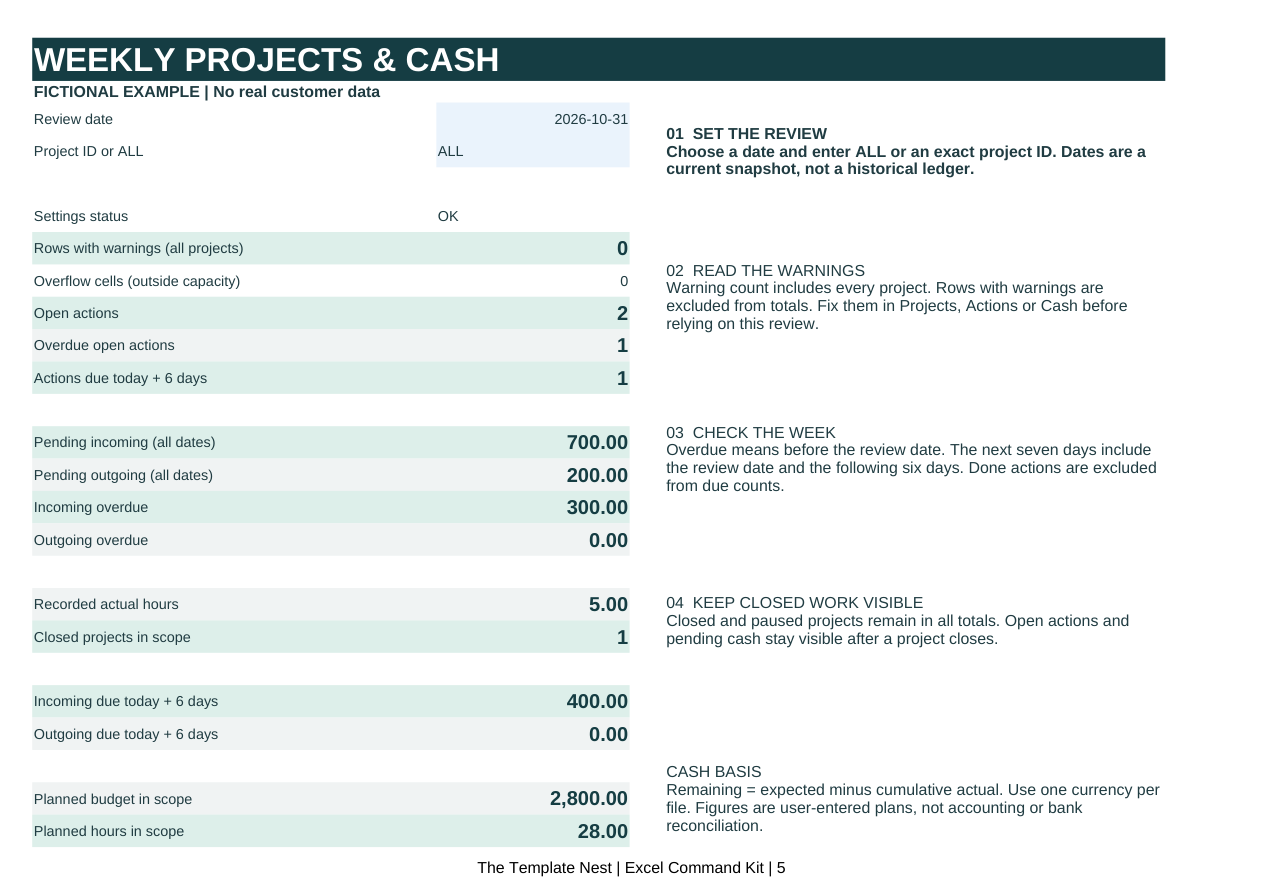
See what needs checking this week.
Set a review date and choose ALL or one exact project ID. Review reads your connected project, action and cash records. Warnings stay visible across all projects.
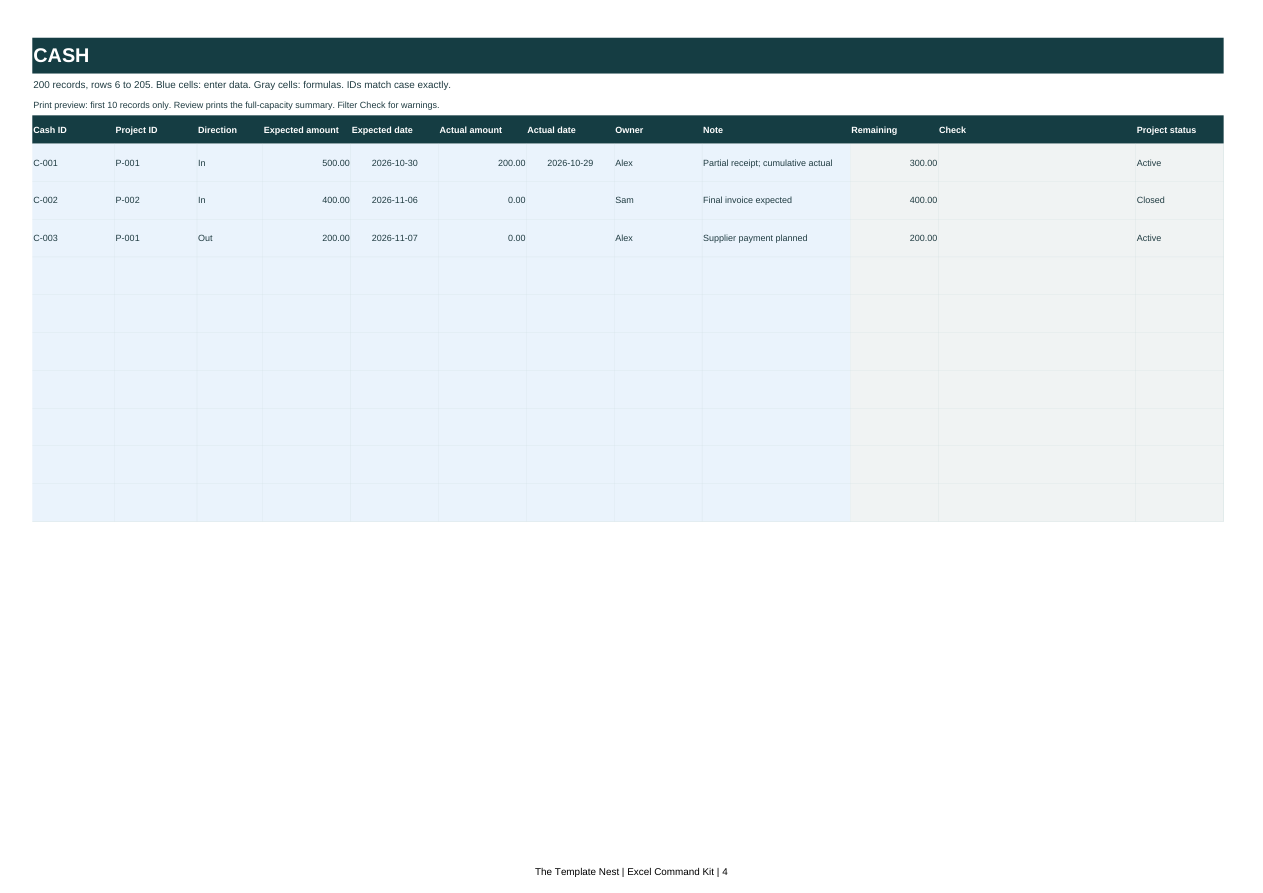
Keep the receipt balance visible.
Record the cumulative amount received against an expected payment. The remaining amount, rather than the original invoice total, feeds the pending summary.
Check warnings before totals.
Invalid rows are excluded. Missing links and invalid dates need attention; a reassuring total is not a substitute for checking your entries.
One workbook. A separate example.
- Excel-Command-Kit.xlsx: blank working file with Start, Projects, Actions, Cash, Review and Checks sheets.
- Excel-Command-Kit-Fictional-Example.xlsx: the same connected structure with fictional entries.
- Setup-Guide.html and Setup-Guide.txt: one guide in two formats, covering setup, weekly review, printing and troubleshooting.
This is one connected workbook, not forty templates. Fixed capacity: 50 projects, 200 actions and 200 cash records. Adding or extending rows is unsupported.
Your weekly review, in three steps.
- Read the example, then enter your own plain values in the blank file's input cells. Use exact project IDs to join records.
- Set Review B4 to your review date and B5 to ALL or one project ID. Resolve the warnings in Checks.
- Review open actions and remaining expected amounts. Update the source records, save your file and keep your own backup.
Check the fit before buying.
Why pay when free templates exist?
Free task lists and cash trackers may be enough. This kit supplies project-ID links, a dated review, visible checks and a worked example together. If you prefer assembling those yourself, keep the free route.
Will this work in my Excel version?
Microsoft Excel has NOT been verified. Tested only in LibreOffice 26.8.0.3 on Linux. Excel Windows, Mac, web and mobile, and Google Sheets are unverified. Do not buy if verified Excel compatibility is essential.
Can I edit or expand it?
Input cells are editable. Formula and unused cells are locked without a password; protection prevents accidental edits, not access. Fixed ranges do not support added rows or extensions. Long labels may need manually increased row heights.
Does it connect to my bank or handle accounting?
No. You enter all records manually, in one consistent currency. There are no bank feeds, currency conversion, audit history, accounting reports or tax calculations. Cash is a current snapshot, not a historical reconstruction.
Can several people edit it at once?
There is no multi-user conflict management. The license covers one purchasing business for internal use, but coordinate edits yourself and retain backups.
How do I get the files and help?
After a successful Stripe purchase, the browser redirects to the download page. Save the four files locally. Email hello@moneyyoureowed.com with your purchase email and receipt reference for download recovery or a product issue. Do not send client records or payment card details.
What if it is not a fit?
Email hello@moneyyoureowed.com within 30 days of purchase to request a full refund. No proof of a financial result is required. Statutory rights remain unchanged.
Get the connected kit.
$37 USD, one payment. One blank workbook, one fictional example, one guide in HTML and text.
Microsoft Excel has NOT been verified. Tested only in LibreOffice 26.8.0.3 on Linux. Excel Windows, Mac, web and mobile, and Google Sheets are unverified. Do not buy if verified Excel compatibility is essential.
One purchasing business, internal use. Request a full refund within 30 days. License, refund, support and privacy terms.
Get the kit